PageDiff / PDF comparison on Mac
PageDiff vs Adobe Acrobat
Choose the PDF tool your work calls for.
PageDiff is a one-time-purchase Mac app for reviewing changes between two PDFs. Acrobat Pro combines comparison with a much broader set of document tools. Here is where each makes sense.
01 / Find your fit
Start with the job you need to do.
Both can help you inspect a revision. The rest of your document workflow determines which is the better fit.
Choose PageDiff for focused Mac review
You have an original and a revised PDF, want to inspect text and visible changes locally, and need a report with your review notes. PageDiff requires macOS 14 or later and has no PageDiff account or subscription.
Choose Acrobat for a wider PDF workflow
You also need PDF editing, conversion, forms, signatures, or a workflow across platforms. If you already have Acrobat Pro, try its included Compare Files tool before buying another app.
02 / Side by side
Compare the tools, including the tradeoffs.
This compares PageDiff with Acrobat Pro desktop. Adobe's free Acrobat Reader is a separate product; its Compare Files workflow is documented for Pro.
| Your task | PageDiff | Adobe Acrobat Pro |
|---|---|---|
| Review text changes | Line-by-line additions and removals from extracted PDF text. | Compare Files produces a differences report, with text-only comparison and change filters. |
| Inspect visible changes | Rendered page views and visual outlines, alongside the text results. | Side-by-side results and document-type settings, including scanned pages. |
| Check selected pages | Separate page ranges, uncertain-match warnings, and manual pairing for pages needing review. | Page-range controls and comparison settings for different document layouts. |
| Keep a review record | Inspection marks and notes in the open comparison; export a PDF report before closing it. | Change statuses, comments, and a saved Compare Results document. |
| Work locally | Comparison and scanned-text recognition run on your Mac. PageDiff does not upload the selected PDFs. | Desktop document tools; Adobe also offers a desktop-only Acrobat Pro 2024 license for offline work. |
| Edit, convert, or collect signatures | Focused on comparison. Does not provide a full PDF editing or signature suite. | Broader editing, conversion, forms, protection, and signature tools; features depend on the plan. |
| Platform | Mac, requiring macOS 14 or later. | Mac and Windows desktop. Check Adobe's requirements and tool availability for your platform. |
| Licensing | One-time Mac App Store purchase. Check the store for your local price. | Subscription plans, plus a three-year non-recurring Acrobat Pro 2024 desktop license. |
03 / See PageDiff
Review the changes in context.
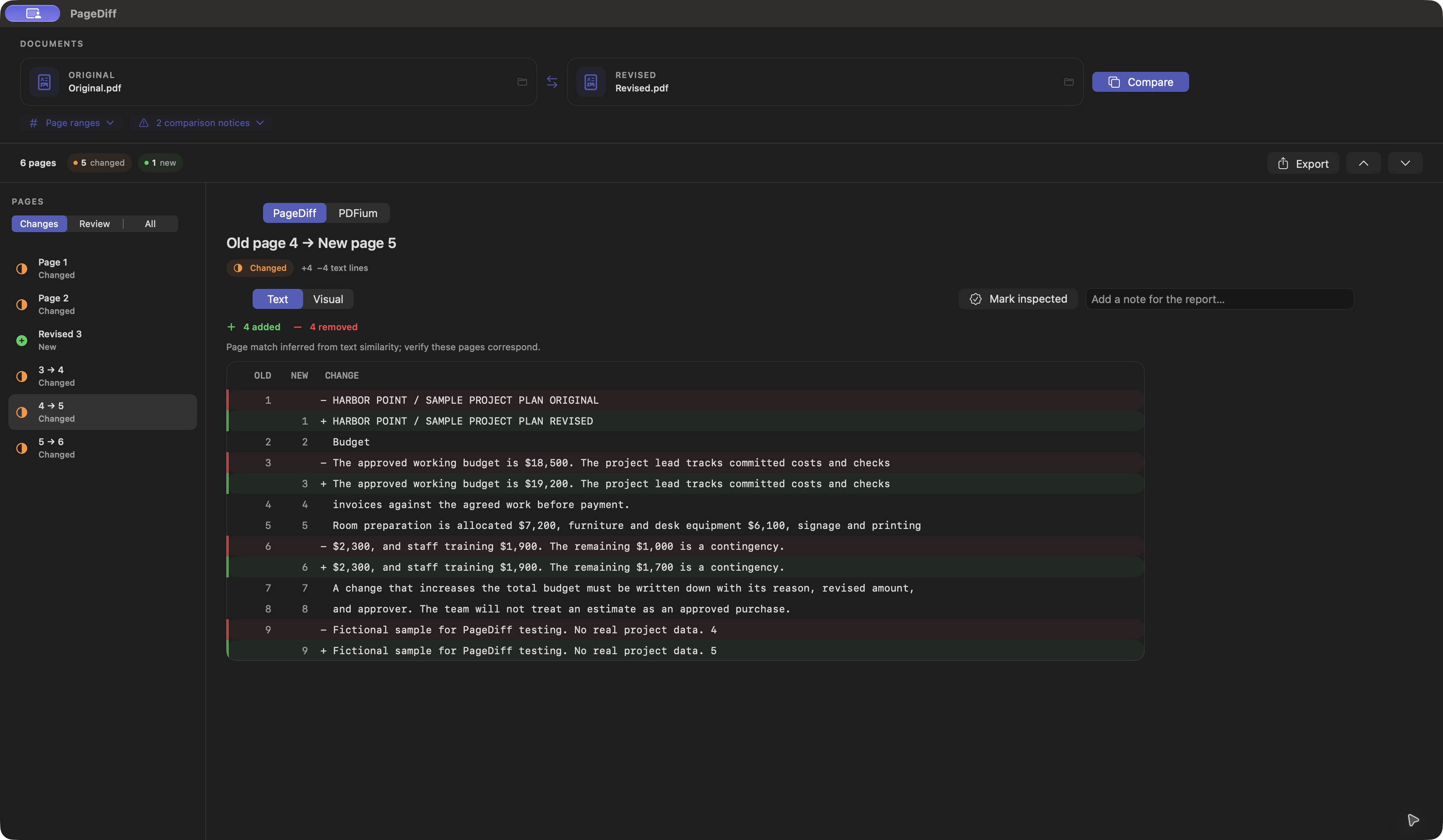
A real PageDiff screenshot comparing fictional project-plan PDFs. Text results sit alongside the page list so you can inspect each revision.
04 / Before you choose
Pricing and practical limits.
Acrobat has more than one licensing option
On October 26, 2026, Adobe's U.S. comparison page listed Acrobat Pro at US$19.99 per month on an annual plan billed monthly. That is an annual commitment. Adobe also advertises Acrobat Pro 2024 as a desktop-only, three-year non-recurring license paid up front. Prices and terms can change; check Adobe's current plans for your region.
PageDiff is a one-time purchase through the Mac App Store. The store shows the current price, tax treatment, and availability for your region.
PageDiff needs your judgment
PDF extraction, page matching, and recognition of scanned text can be uncertain. Layout changes can appear as visible differences. A clean visual result means no difference was found at the comparison resolution; check the source PDFs before relying on a result for consequential work.
Review notes and inspection marks last only for the open comparison. Export a report before closing or replacing it. Reports are standard, unencrypted PDFs and can include filenames, page previews, differences, and notes.
Local comparison and cloud storage are separate
PageDiff does not send your selected PDFs, comparison results, or notes to Rappasoft. If you choose files in iCloud Drive or another synced folder, or save a report there, that provider's storage settings still apply. This describes PageDiff's workflow; it does not imply that Acrobat requires you to upload PDFs for desktop comparison.
Make the choice with your own documents
If your work depends on Acrobat's broader tools, integrations, or established review workflow, keep those needs in the decision. PageDiff makes sense when focused comparison on a Mac is the job you want to buy it for. This page does not claim equal detection accuracy or feature parity.
Adobe and Acrobat are trademarks of Adobe. Rappasoft is independent of Adobe.